Web-app delfshaven
Nederlands
Wanneer je delfshaven bezoekt of gaat bezoeken, is het wellicht een goed idee om even de web-app van deze website op je smartphone te installeren. Het voordeel hiervan is dat je niet elke keer het internetadres hoeft in te typen.
Doordat de web-app geen adresbalk laat zien, krijgt de inhoud van de pagina's meer ruimte.
De web-app is na gebruik eenvoudig weer te verwijderen.
De installatie is simpel, maar verschilt per smartphone.
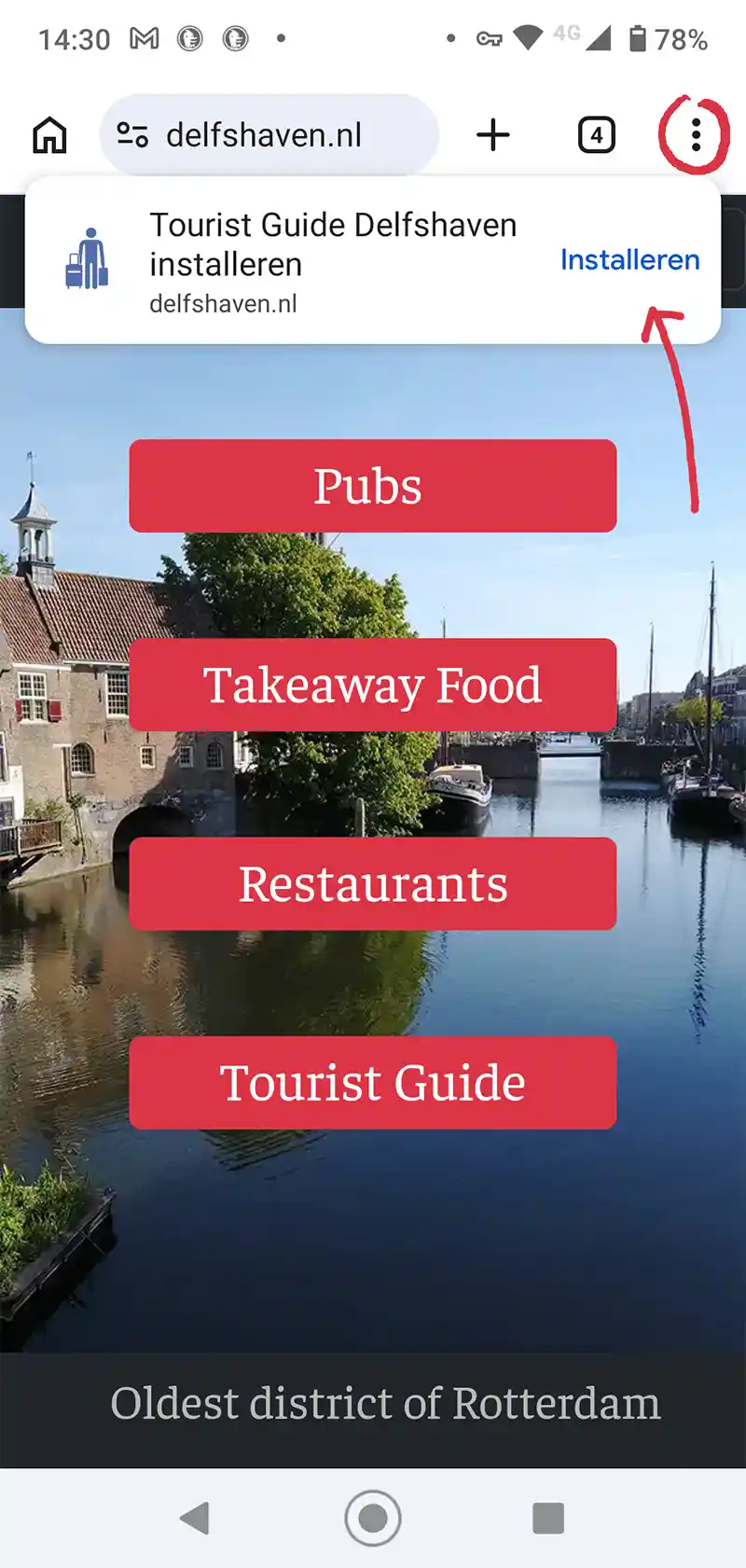
Wanneer je de browser Chrome gebruikt, zal bij de eerste keer dat je de website delfshaven.nl bekijkt, bovenaan het beeldscherm de melding 'installeren' te zien zijn. Daarop kan geklikt worden en binnen een paar seconde staat het klaar voor gebruik. (Het is te herkennen aan het blauwe touristen poppetje met twee koffers)
Wanneer die melding niet te zien is, kan in de meeste gevallen rechtsboven op de drie puntje worden geklikt om de installeer optie zichtbaar te maken. Op deze pagina zie je een voorbeeld van zo'n schermafbeelding.
English
When you visit or plan to visit Delfshaven, it might be a good idea to install this website's web app on your smartphone. The advantage is that you won't have to type in this internet address every time. Because the web app has no address bar, it will also look more organized. The web app can be easily removed after use. The installation is simple, but varies by smartphone. If you use the Chrome browser, the notification 'installing' will appear at the top of the screen the first time you view the website delfshaven.nl. You can click on this, and it will be ready for use within a few seconds. (It can be recognized by the blue tourist icon with two suitcases.) If that notification is not visible, in most cases you can click on the three dots in the top right corner to make the install option visible. On this page, you can see an example of such a screenshot.
Français
Lors de votre visite ou de votre projet de visite à Delfshaven, il peut être judicieux d'installer l'application web de ce site sur votre smartphone. L'avantage ? Vous n'aurez plus besoin de saisir l'adresse internet à chaque fois. De plus, l'absence de barre d'adresse rend la navigation plus agréable. L'application web se désinstalle facilement après utilisation. L'installation est simple, mais varie selon le smartphone. Si vous utilisez le navigateur Chrome, la notification « Installation en cours » apparaîtra en haut de l'écran lors de votre première visite sur le site delfshaven.nl. Cliquez dessus et l'application sera prête à l'emploi en quelques secondes. (Elle est reconnaissable à son icône bleue représentant un touriste avec deux valises.) Si cette notification n'est pas visible, vous pouvez généralement cliquer sur les trois points situés en haut à droite pour faire apparaître l'option d'installation. Vous trouverez une capture d'écran à ce sujet sur cette page.
Español
Cuando visites o planees visitar Delfshaven, te recomendamos instalar la aplicación web de este sitio en tu smartphone. La ventaja es que no tendrás que escribir la dirección web cada vez. Además, al no tener barra de direcciones, la aplicación web tiene un aspecto más organizado. Puedes desinstalar la aplicación web fácilmente después de usarla. La instalación es sencilla, pero varía según el smartphone. Si usas el navegador Chrome, la primera vez que visites delfshaven.nl, aparecerá una notificación de "Instalando" en la parte superior de la pantalla. Haz clic en ella y estará lista para usar en pocos segundos. (La reconocerás por el icono azul de turista con dos maletas). Si no ves esa notificación, en la mayoría de los casos puedes hacer clic en los tres puntos de la esquina superior derecha para que aparezca la opción de instalación. En esta página puedes ver un ejemplo de captura de pantalla.
Italiano
Quando visitate o avete intenzione di visitare Delfshaven, potrebbe essere una buona idea installare l'app web di questo sito sul vostro smartphone. Il vantaggio è che non dovrete digitare l'indirizzo internet ogni volta. Poiché l'app web non ha una barra degli indirizzi, risulterà anche più ordinata. L'app web può essere facilmente disinstallata dopo l'uso. L'installazione è semplice, ma varia a seconda dello smartphone. Se utilizzate il browser Chrome, la notifica "Installazione in corso" apparirà nella parte superiore dello schermo la prima volta che visitate il sito web delfshaven.nl. Cliccandoci sopra, l'app sarà pronta all'uso in pochi secondi. (È riconoscibile dall'icona blu del turista con due valigie.) Se la notifica non è visibile, nella maggior parte dei casi potete cliccare sui tre puntini nell'angolo in alto a destra per visualizzare l'opzione di installazione. In questa pagina potete vedere un esempio di schermata di installazione.
Deutsch
Wenn Sie Delfshaven besuchen oder einen Besuch planen, empfiehlt es sich, die Web-App dieser Website auf Ihrem Smartphone zu installieren. So müssen Sie die Internetadresse nicht jedes Mal neu eingeben. Da die Web-App keine Adressleiste hat, wirkt sie zudem übersichtlicher. Die Web-App lässt sich nach Gebrauch problemlos wieder entfernen. Die Installation ist einfach, kann aber je nach Smartphone variieren. Wenn Sie den Chrome-Browser verwenden, erscheint beim ersten Aufruf von delfshaven.nl oben auf dem Bildschirm die Benachrichtigung „Wird installiert“. Klicken Sie darauf, und die App ist innerhalb weniger Sekunden einsatzbereit. (Sie erkennen sie am blauen Touristen-Symbol mit den zwei Koffern.) Sollte die Benachrichtigung nicht angezeigt werden, tippen Sie in den meisten Fällen auf die drei Punkte oben rechts, um die Installationsoption einzublenden. Auf dieser Seite finden Sie ein Beispiel für einen solchen Screenshot.